 LogQuill
Help and feedback
Where to find these guides, and how to ask a question, report a problem or share an idea.
Who: everyone.
Open Help & feedback at the bottom of the sidebar.
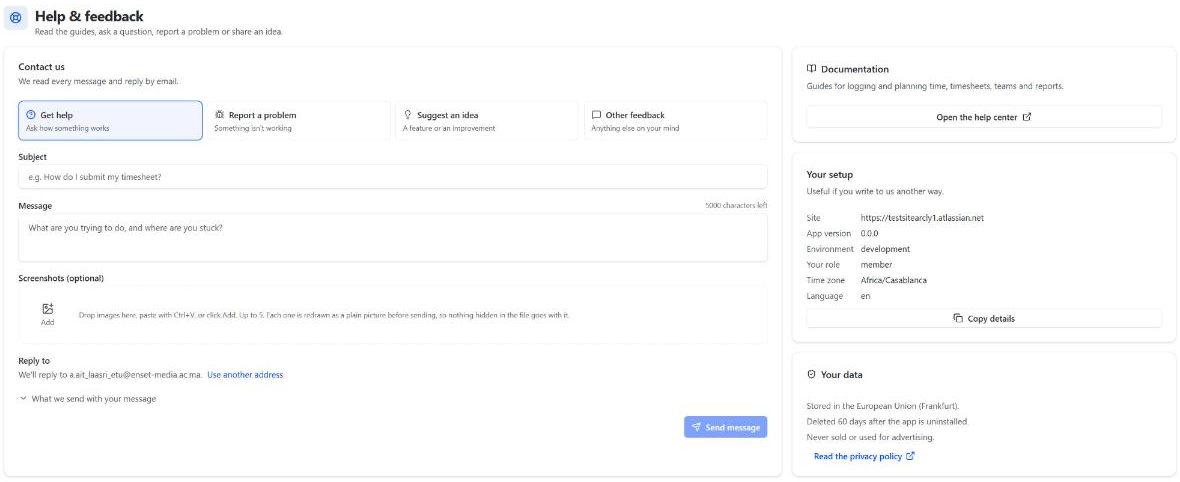
Write to us
Choose what it's about (Get help, Report a problem, Suggest an idea or Other feedback), write a subject and your message, and choose Send message. We read every message and reply by email, to your address or another one you give. The address Jira has for you gets a copy of your message (another address you give is only where we reply), and the page shows its reference (such as LQ-97PLUV) to quote if you write again.
- Screenshots (optional): drop images on the form, paste them with Ctrl+V, or choose Add. Each one is redrawn as a plain picture before it's sent, so nothing hidden in the file goes with it.
- What we send with your message is listed on the form before you send it: your site, the app's version, your role, time zone, language and browser. Nothing else is sent.
Your setup
The same details, with Copy details, in case you write to us another way.
Your data
Where your data is kept, when it's deleted, and a link to the privacy policy.