 LogQuill
Holidays
Public holiday lists per country, and which country's holidays each person takes.
Who: people with Holidays. Open Admin, then Holidays.
A public holiday is a day off: nothing is required that day, and it's shaded across the app. Each person takes one country's holidays.
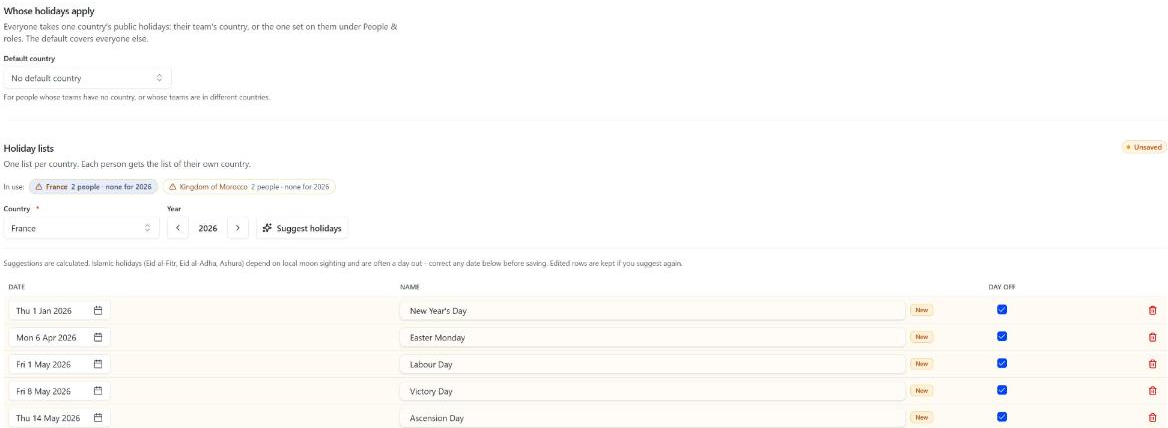
Whose holidays apply
Each person takes the holidays of:
- the country set on them under People & roles, if any;
- otherwise, their teams' country, when their teams agree;
- otherwise, the default country: the first of the countries you operate in;
- otherwise, none.
People in teams in different countries fall back to the default, and are listed here so you can pick their country. LogQuill never picks it for you.
Holiday lists
Pick one of the countries you operate in, at the top, and a Year. There's one list per country; the default country's opens first.
Choose Suggest holidays to fill in that country's public holidays, or Add a holiday one by one. Untick Day off for a holiday your organization works.
Check the dates, then Save holidays.
Suggested dates are calculated. Islamic holidays (Eid al-Fitr, Eid al-Adha, Ashura) depend on local moon sighting and are often a day out: correct them before saving.
Changes and past timesheets
Changing holidays, or someone's country, changes what's required from then on. A timesheet already submitted or approved keeps the required hours it had, day by day.