 LogQuill
Team settings
Team types, countries and projects, for every team on the site.
Who: people with Team options. Open Admin, then Teams. Teams themselves (their members and leaders) are managed from Teams in the sidebar: Teams.
Team types
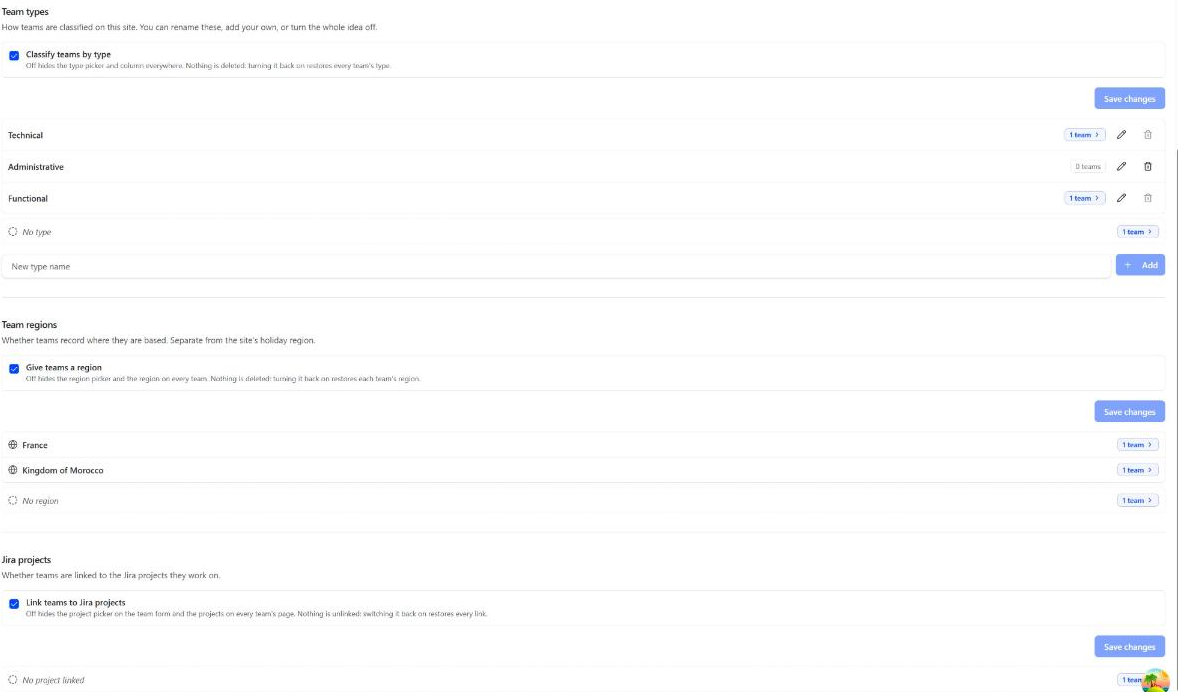
How teams are classified on your site: Team (the default), technical, administrative and functional out of the box. Rename them, add your own, or delete one.
Every team has a type, because the type decides who approves its absences (Who approves). A new team starts on the default type, Team, and so does any team without another; the default type can be renamed but not deleted. Deleting another type that teams still have asks which type they move to (the default one at first). They move there, then the type is deleted, and each team's move is in the audit log.
Click a type's team count to see its teams, edit or delete them, and search them by name.
Team countries
How many teams are based in each of the countries you operate in, and how many have none. A team's country is set on the team, and decides its members' public holidays (Holidays). With a single country, this section and the team's country field are hidden: every team is there.
Jira projects
Link teams to Jira projects: whether teams list the Jira projects they work on, shown on each team's page. Turned off, the projects are hidden on every team, and nothing is unlinked: switching it back on restores every link.
Below it, two counts that cover every team: those linked to at least one project, and those with no project linked. Click a count to see those teams, search them by name, and edit them. The linked ones show their projects' keys (every name on hover).