 LogQuill
Time logging
Whether a day's time may go past its working hours, and what people fill in when they log time.
Who: people with Time logging settings. Open Admin, then Time logging.
Daily hours
Whether a day's logged time, and separately a day's planned time, may go past that day's working hours (from General).
- Allowed: people can log or plan past the working hours, up to the 24 hours a day has.
- Limited: a day's time can't go past its working hours. Weekends and public holidays, which have none, take no time at all. For logged time, time ticked as Overtime isn't limited and doesn't count toward the limit (while the Overtime field is on). For plans, nothing is exempt.
On a day of an approved absence, the limit stays the usual day's hours, unless the absence's type allows no time at all.
An edit is only refused when it raises the total of a day already over the limit, so fixing a description on a full day always works. A day never takes more than 24 hours of worklogs, or of plans, whatever the setting.
These rules apply to time logged in LogQuill. Time logged directly in Jira, or by another app, is brought in as it is.
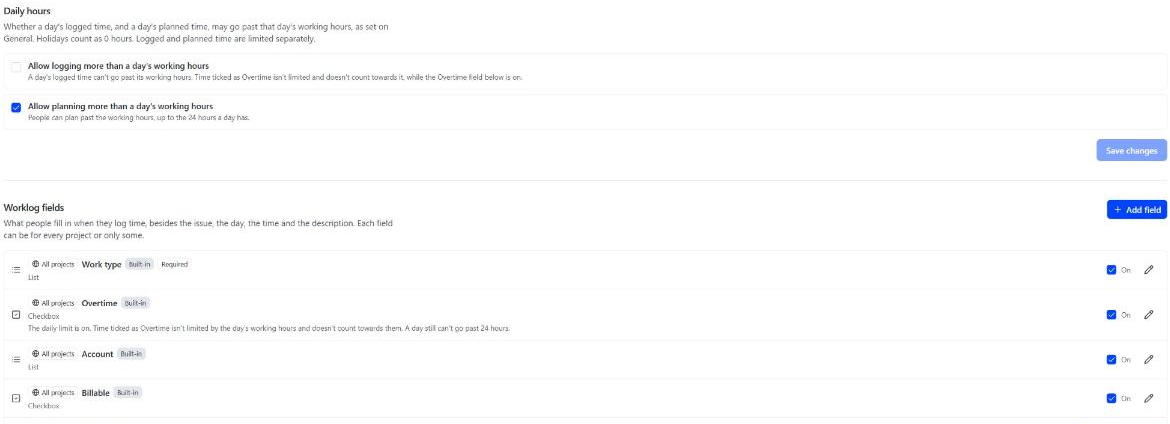
Worklog fields
What people fill in when they log time, besides the issue, the day, the time and the description. Each field can be on or off, required or not, and for every project or only some.
Built-in fields
- Work type: what each entry is filed under, such as development or meetings. Its options are your work types: add, rename or remove them here (changes save at once). A removed work type disappears from new entries and stays on past ones. Turned off, work types vanish everywhere and entries keep theirs.
- Overtime: a box people tick for overtime. While the daily limit is on, ticked time isn't limited and doesn't count toward it.
- Account and Billable, for sites that use accounts.
Your own fields
Add a field, and give it a name and optional help text.
Choose its type: text, number, checkbox, or list (with its options).
Choose where it applies: All projects, or the projects you pick. People only see it in Log time for issues in those projects.
Make it required if new entries can't be saved without it.
Rules worth knowing:
- Required is checked when time is logged, and a required value can't be cleared later.
- Turning a field off, deleting it, or narrowing its projects removes it from new entries; entries that have a value keep it.
- A removed list option stays on the entries that have it.
- List and checkbox fields, and overtime, can be used as filters in the table and in reports; every field can be grouped by.
- Values are also saved on the worklog in Jira, so they come back if the app is reinstalled.
Timesheet settings
How long a timesheet covers, how it's handed in, what's locked afterwards, and the emails around it.
Absence types
The kinds of absence people can ask for, who approves them, what each allows on its days, supporting documents, HR without a Jira account, and absences from Odoo or calendars.